Copy DVD Leopard
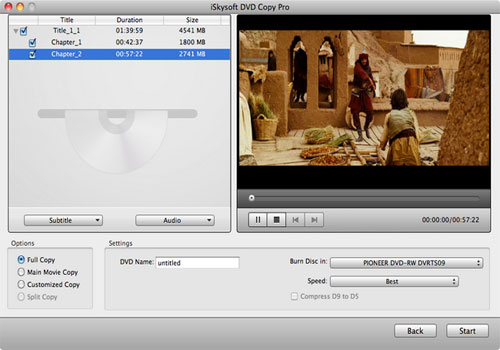
Copy DVD Leopard is excellent Mac DVD copy and DVD burner software to backup DVD from disc to disc and burn DVD on Mac OS X Leopard with the high DVD copy quality. Either to copy DVD on Mac perfectly in 1:1 ratio like copying DVD to DVD(D5 to D5, D9 to D9), or to compress DVD-9 to DVD-5 disc is pretty steady, fast and easy. Copy DVD Leopard is definitely your best and simplest solution to copy and backup DVD movie on Mac OS X Leopard.
This Mac DVD Copy software can not only copy DVD movie to ISO files/DVD folder for backup DVD to Mac Leopard, but also burn ISO files or DVD folder to DVD disc on Mac Leopard. Copy DVD Leopard has intuitive interface and brings you more conveniences.
Note: Copying a DVD on Mac does no harm to the original DVD disc.
Key Features of Mac DVD Copy software
- Copy and compress DVD
Clone and copy DVD movies for backup and share: copy D9 to D9,D5 to D5 completely in 1:1 ratio. Compress DVD like copy DVD9 to DVD5 with optimized DVD compress quality. - Backup DVD files
Mac DVD Copy allows you to copy commercial DVDs or duplicate homemade DVDs to DVD discs to protect them from damage or share your DVDs with others. - Burn DVD files to DVD Disks
Easily burn VIDEO_TS files, dvdmedia, and ISO file on your Mac to DVD disks for TV playback, vehicle DVD player, or portable DVD players. - Extensive Output Support
Make exact copy of your DVD on Mac , either in DVD Folder, dvdmedia file or ISO format, which is ready to be played from the hard drive with Apple DVD Player. Protect your DVD gems from being lost or damaged. - Entertainment On The Go
You don't have to lug around bulky discs, since it can Copy DVDs to MacBook. Besides, play movies from hard drive sucks up less battery power than using optical drive.
- Select Subtitle and Audio Track
You can choose any subtitle (or without subtitle) and sound track according to your want for DVD Backup. - Burn Selected DVD Chapters
This Mac DVD Copy allows you to select any DVD title(s)/ chapter(s) to burn quickly and easily. - Easy to use
Just 3 steps can copy DVD movies with the Copy DVD Leopard: select source, select target and hit Start button
MAC OS X or above operating system. At least 512M physical RAM.
* Intel-based Mac(32-bit or 64-bit)
* Fully compatible with Mac OS X 10.7 (Lion)