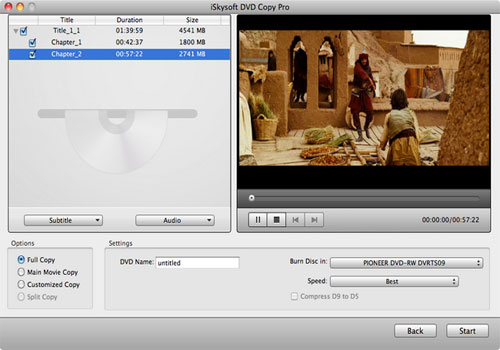
Mac DVD Copy
With Mac DVD Copy software, you can backup both commercial encrypted DVDs and homemade DVDs directly into DVD disc or to DVD Folder, dvdmedia file or ISO file that can be played with Apple DVD Player. In addition, it allows you to easily burn VIDEO_TS files, dvdmedia, and ISO file to DVDs for watching on your big screen TV or to be used with portable DVD players like car DVD player.
Especially designed for Mac users, DVD Copy for Mac allows you to copy DVD movie in 1:1 ratio like copy D5 to D5 and copy D9 to D9. It can copy your DVD on Mac with the original quality 100% preserved and at the same time remove DVD protections such as CSS, RC and RCE.
As professional Mac DVD Copy software, it also provides you to copy DVD successively, select subtitle, audio tracks according to your preference, include the DVD Menus or remove it to your own defined DVD, or edit your DVD volume.
Note: Copying a DVD on Mac does no harm to the original DVD disc.
Key Features of Mac DVD Copy
- Burn DVD form ISO image
Burn ISO image files or DVD folder to DVD movie, and enjoy movie feast with home or portable DVD player. - Mac DVD backup
Without blank disc at hand, then backup DVD to ISO image file or DVD folder on the hard disk, then play the DVD movie without DVD driver.
- Burn DVD files to DVD Disks
Easily burn VIDEO_TS files, dvdmedia, and ISO file on your Mac to DVD disks for backup and share: copy DVD9 to DVD9, DVD5 to DVD5 completely in 1:1 ratio. - Compress DVD on Mac
Copy D9 disc to two D5 discs, splitting DVD movies in half while preserving the original quality. - Copy any DVD on Mac
Easily remove DVD protections including CSS, RC and RCE. - Rip DVDs for Apple Devices
Rip DVD movies directly for viewing on iPhone 3GS, iPhone4, iPod Touch, iPad. - Fully compatible with Mac OS X 10.7 (Lion)
- Select Subtitle and Audio Track
Allows you to choose any subtitle (or without subtitle) and sound track you want for DVD Backup.
System Requirements
MAC OS X or above operating system. At least 512M physical RAM.
* Intel-based Mac (32-bit or 64-bit)
* Fully compatible with Mac OS X 10.7 (Lion)