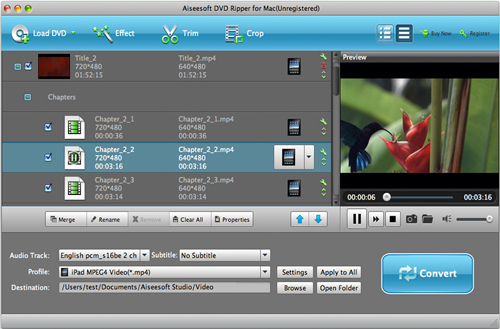
Rip DVD to iPod Mac
As a professional Mac DVD ripper software, Rip DVD to iPod Mac is the easiest-to-use and fastest DVD to iPod ripper software for Apple iPod Movie and iPod Video. Rip DVD to iPod Mac is versatile DVD Ripper for Mac software which can rip DVD to almost all the popularly used video and audio formats.
Rip DVD to iPod Mac can rip DVD to iPod touch mac and iPod nano mac with high speed and excellent output quality. Furthermore, it provides you with a series of powerful and easy-to-use movie editing functions such as trimming, cropping, merging, adjusting effect, etc.
Just download a trial version of Rip DVD to iPod Mac for free on-line and enjoy your colorful digital life.
Why Choose Rip DVD to iPod Mac
Rip DVD to iPod Mac can rip DVD to almost all kinds of popular video and audio formats for you to play movies on many portable players.
Rip DVD to iPod Mac provides many powerful edit functions such as Merge, Trim, Crop and so on.
Rip DVD to iPod Mac provides super conversion speed, completely support dual core CPU.
How to Use Rip DVD to iPod Mac
Step 1: Download, install and run Rip DVD to iPod Mac.
You can free download this trial version right now.
Step 2: Import source DVD movie by clicking  button.
After the movie is loaded, you can see all the chapters and titles in it, then you can check the one you want to convert or just keep all the titles or chapters checked to convert the whole movie.
Step 3: Choose iPod supported video or audio formats as the output file type from the Profile drop-down list and choose your favorite folder to save the output video or audio file.

Step 4: Click the  button. Rip DVD to iPod Mac will start the conversion work immediately and finish it in a few seconds.
Now free download this Rip DVD to iPod Mac and experience the wonderful performance by yourself!